
July 24, 2026
Umbraco 18 landed in June 2026, and the headline feature is one that quietly fixes something every Umbraco team has worked around for years: reusable content that isn't a page.
This is Phase One of Elements, managed in a brand-new Library section of the backoffice. Here's what changed and how you work with it in code.
The problem: content that isn't a page
Think about the content on a site that doesn't belong to any single page. Site-wide settings. Footer data. A promotional block that shows up in ten places. A repeated call to action.
None of it is a page, but for a long time there was nowhere else to put it. So, the workaround became a habit: create a "settings" or "global" node in the content tree, fill it with template-less document types, and reference it from your templates.
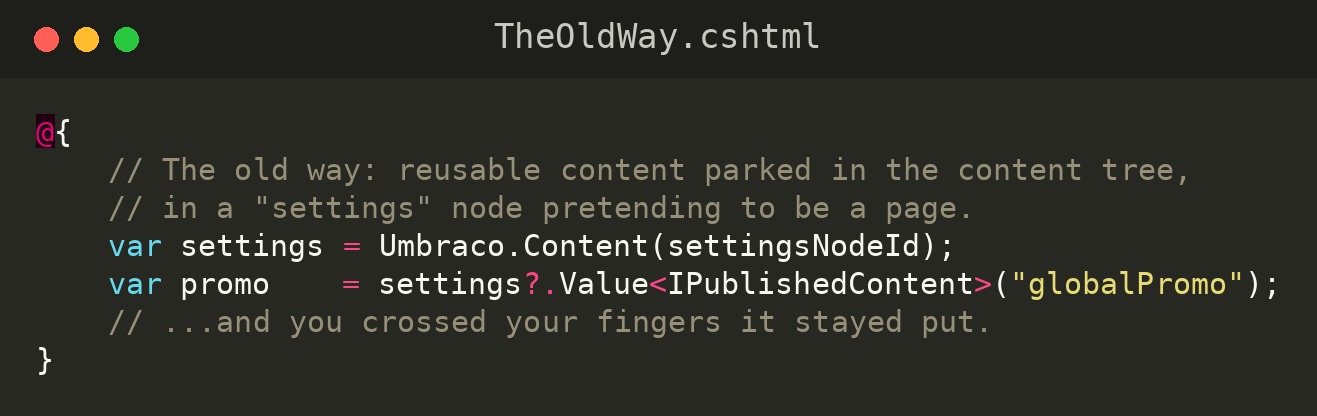
It works. But that content has no real home, no clear ownership, and nothing stopping an editor from moving or unpublishing it and quietly breaking three other pages.
Elements aren't a new idea, having a home for them is
Here's the part worth being precise about: element types aren't new. Non-routable content types have been part of Umbraco for years, powering Nested Content and the Block List and Block Grid editors. If you've built with blocks, you've been using element types the whole time.
What Umbraco 18 adds is the Library: a dedicated backoffice section where reusable content lives as first-class Elements, outside the document tree. Elements are the first non-routable content type to move in, and the Library is designed to grow from there.
In other words, 18 doesn't invent Elements. It finally gives them somewhere to live.
What "first-class" means
The reason this matters is that Elements in the Library get the same guarantees you already rely on for pages:
- Reference tracking - see everywhere an Element is used before you change or delete it.
- Scheduled publishing - publish and unpublish reusable content on a schedule.
- Rollback - revert to a previous version.
- Permissions - control who can edit what.
- Audit logs - a record of who changed what, and when.
- Recycle bin - deletions are recoverable, not catastrophic.
- Workspace validation and global search - the same editing safeguards and findability as the rest of the CMS.
That's the difference between a "settings node" you hope nobody touches and reusable content that's genuinely managed.
How you use it as a developer
The workflow is straightforward: define your element types, create and publish Element instances in the Library, then reference them on a page with an Element Picker. Rendering them is the same pattern you already know from blocks, an Element is an IPublishedElement, so you can hand it to a partial keyed on its content type.
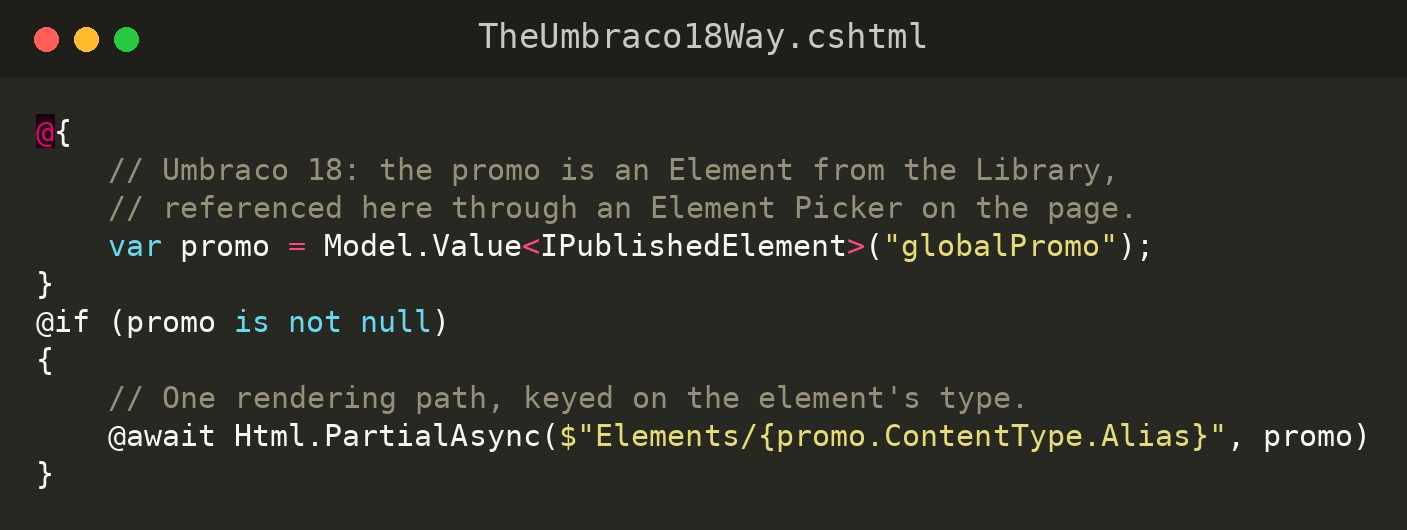
One rendering path handles every element type: create a partial per type (for example /Views/Partials/Elements/GlobalPromo.cshtml), and .NET does the casting for you. The property alias and partial path above are just examples; swap in whatever matches your project.
A practical note if you live in the Block Editor
The deeper Block Editor integration (mixing Elements alongside standalone blocks) isn't in Phase One (more on that below). Until it arrives, a common approach is a lightweight "bridge" block: a Block that simply wraps an Element Picker. That lets you drop Library Elements into a Block List today, while the reusable content stays managed centrally in the Library.
What's not here yet
Be clear-eyed about the roadmap before you plan a migration around it. What shipped in 18 is Phase One: the Library, Elements as reusable content, full management, and the Element Picker.
What's still to come (targeted for Umbraco 19, later in 2026) is the bigger payoff: mixing Elements alongside standalone blocks directly in the Block Editor, converting existing blocks into reusable Elements, and customizing Elements per page. If that Block Editor integration is the specific thing you're waiting for, it's one release away. If a clean home for reusable content solves a real problem for you now, Phase One delivers that today.
Also worth knowing in 18
For the API-minded: the Delivery API can now generate typed OpenAPI schemas for each Document Type, Element Type, and Media Type (opt-in), which makes headless front-ends and AI tooling far less guesswork. Under the hood, OpenAPI generation moved from Swashbuckle to Microsoft.ASPNetCore.OpenApi.
One breaking change to note while you're upgrading: the parent and Children properties were removed from IPublishedContent. In Razor, use the Parent () and Children () extension methods instead.
The bottom line
Element types were always here. Umbraco 18 finally gives reusable content a proper home.
If your content tree is carrying a folder of fake "settings" pages, this is the release that lets you clean it up, and give that content the tracking, versioning, and permissions it should have had all along.